
Chapters and the story map
How a story's reels are arranged in chapters, which way people swipe between them, and how to add and move reels on the story map.
A story is made of chapters. Each chapter is a run of reels about one thing: a product, a question, a step. People move through the chapters in order, and can look further into any chapter on the way.
Which way people swipe
In a story, people swipe up to the next chapter and sideways for more in the same chapter. The first reel of each chapter is its main reel, and together the main reels make the story's main path. The other reels in a chapter branch off its main reel.
You can turn this around: open the story's Appearance tab, find Swipe direction, and set Alignment to Horizontal. Then people swipe sideways from chapter to chapter, and vertically for more in the same chapter. That suits shop stories, where each chapter is a category.
The story map
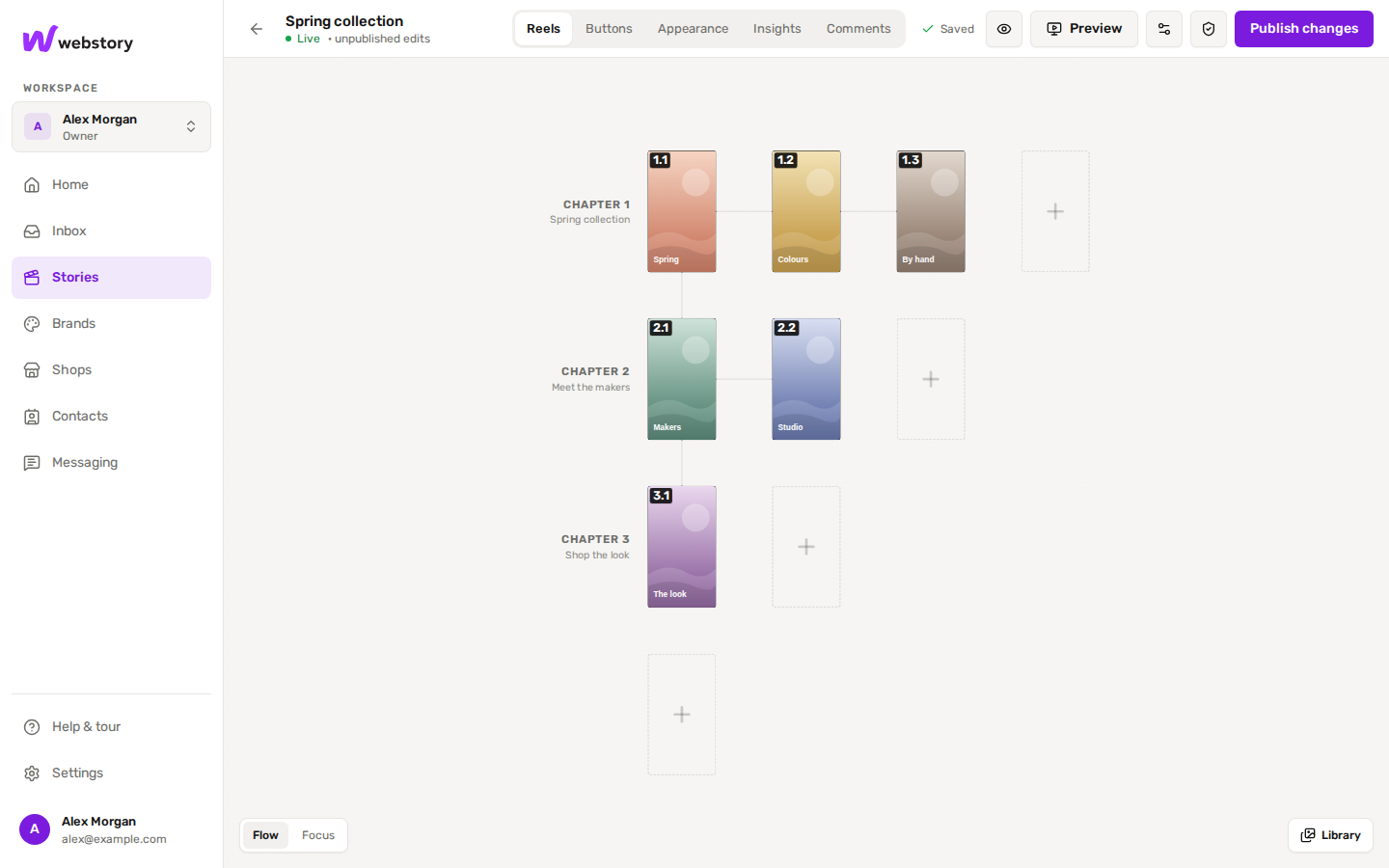
The story's Reels tab is its map. It has two views:
- Flow shows the whole story. Every chapter is a row (a column in a horizontal story), labelled Chapter 1, Chapter 2 and so on. Drag reels to reorder them, or drop videos from your computer onto the map.
- Focus shows one reel at a time.
Add reels and chapters
In Flow, use the + tiles: Add more to chapter 2 adds a reel to that chapter, and Add a new chapter starts one.
In Focus, the + buttons on a chapter's last reel add more: More in this chapter adds a reel to that chapter, and on the story's last chapter, Next chapter adds a new one.
In Flow, right-click a reel for more: Add reel before, Add reel after and adding a chapter next to it.
You can also add from your library: choose the Library button at the bottom right of the Reels tab, pick files, and choose where they go, such as the next chapter or the end of the story.
Move a reel
Drag it on the map. Or open it with Edit reel, choose Move reel (the four-arrows button at the top of the panel), and pick where it should appear, such as "Main path, position 3". A chapter's other reels move with its main reel.
Good to know
- Buttons can send people anywhere in the story, not only to the next reel. See Buttons.
- Insights show where people leave the story, reel by reel.
Using an AI agent
get_story returns a story's outline: its chapters and the reels in each, in order, with their titles. To see what's on one reel, the agent uses get_reel.
An agent with permission to change drafts adds reels as new chapters, or after a reel on a chapter's side path, with add_reels, and moves them with move_reel. A chapter's other reels move with its main reel, as they do when you drag it.